


Manual stationary heating LCD Azul / LCD Dorado / LCD Rojo

These three models are the same, They have some changes compared to the black LCD which we are going to describe.
Default settings in advanced menu:
- 1.6 hz
- 4.5 hz
- 1680 rpm
- 4500 rpm
- 12V
- SN-1
- PF-5 (spark plug power: 0 = minimum – 5 = maximum)
How to bleed the heating
Pressing configuration key + right arrow. Pondra H Off, With the arrow we can change from OFF to ON to purge or stop doing it.
Pair or associate the Red controller with the Blue LCD

Associate the blue screen, golden, or red with the two-way red remote control is very simple.
You may have noticed that in some photos or screens you do not see the 3 coverage stripes at the top of the screen, That's because it doesn't have any associated controls yet., once you do it, will appear.
- First of all, we press right arrow of the LCD screen of the heating during 5/6 seconds until appears HFA
- We turn on the red control by pressing any key and it will put “connecting pls wait“, then we press the power button + OK will appear FOR PAIRING just below the previous message in yellow letters.
- Immediately afterwards the 3 coverage lines on the screen and the remote control will be associated.
How to change the language of the Red remote control from Chinese to English?
Once the controller is paired with the screen (essential for it to work) we press the button OK during 5 seconds, It will then be translated from Chinese to English immediately..
How to program the on and off of static heating with Blue LCD
Unlike the screen black LCD with round buttons that have 2 programmers through time, as if it were an alarm clock, the screen LCD azul, red and gold they only have 1 just programmer.
The operation is very different, It's like a countdown timer. To understand it easier it would be like saying:
- turn on 3 hours
- Turn off on 8 hours.
Heating modes
This screen can work 2 ways, by degrees (thermostat) or why power (hz)
To change between one mode or another we must press the left arrow + OK.
- In the mode thermostat, we select the temperature we want, It will adjust itself to maximum power until it reaches it and then it will be set to minimum to maintain it., the heating will never turn off.
- In the mode HZ will allow you to select between 0.8hz – 4.5hz being 0.8 the lowest power (depending on heating it may vary), It will remain that way until we change or modify it..
How to turn on the heating from the red remote control?
To turn it on it is not enough to press the power button, you have to keep it pressed 2/3 seconds. To turn off you have to do exactly the same.
Get ahead of possible errors, configure your heating to use in height
Here Do you have a manual on how to configure your static heating in the mountains?, if it is not done, Over time, carbon will be created in your heating, making it difficult to turn on., which will cause white smoke and not turn on.
How to turn off the heating?
It is very simple, Press and hold the on/off button for a few seconds, the display will say OFF and will disappear.
The heat will stay on to cool you down., after a few 10/15 minutes, when it's cold, the fan stops.
It is very important not to unplug it from the power, to do so, the heating will stay hot, and can damage the electronics, and melt inside, leaving it useless.
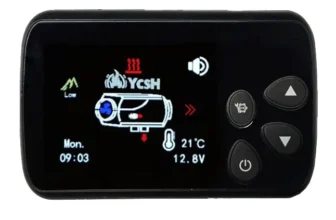
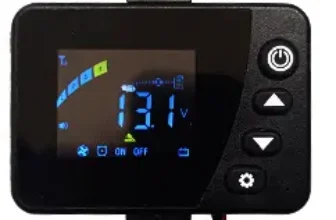


Hola, hello good, first of all congratulations for this website, since it must be the only one in Spanish and so well explained.
I have one of these with the blue programmer, It came to me with a bidirectional control instead of red in black. When trying to pair it (Holding down the right arrow button, HF) It links me to the remote control and I get heating data on this. But once the screen goes away on its own, this one stops being seen. At no time does the icon of the 3 streaks in the upper area of the screen indicating that a controller is connected. Some clue?? The control will be wrong? What am I doing wrong???
I thank you very much for the response, or a clue that it could be. Gracias
Hello John, if you press any of the buttons on the black remote, does not connect again? In principle it should reconnect when you touch a button