


LCD Negro (version 2019 hybrid)
How to enter the settings
You have to press and hold the configuration button for a few seconds. After that time C1 appears, C2, C3, C4.
C1:
In this submenu, we can adjust the screen time.
C2:
To schedule power on and off.
Once in C2, you have to press the power button, this screen will appear:

Los 2 first digits correspond to the time, the next digit 5 in this case, corresponds to the minutes, goes in multiples of 10, therefore they would be 13:50 / 13:10 / 13:20…
The last digit corresponds to O ignition, o C off.
C3:
Option to sync the remote control, this option is selected, and then click on one of the 2 remote control buttons (the heating will turn on).
Remember, The controls usually come without the battery, if it doesn't work for you, check that he has it.
C4:
To change the operating mode between HZ (manual mode, you select a constant power).
Or By Degree mode, that automatically adjusts the heating power depending on the ambient temperature.
How to activate height mode
This version NO has height mode
How to activate the on/off scheduler
Activated by pressing the arrows “above” y “below” simultaneously, You can confirm that it is activated because an alarm clock icon will appear on the left side of the screen.
How to purge the heating
You have to press 5 times the setup button quickly.
Switchboard
This screen uses a different version of the control unit than the usual one. I'll post a photo so you can tell the difference.. If your screen does not show voltage data, temperature.. it won't let you turn it on, etc.. It is possible that they sent you the heating with the wrong control unit. It seems incredible that something like this could happen., but if.. occurs, because they exist 4/5 different versions of that same screen, and externally there is no way to differentiate them.


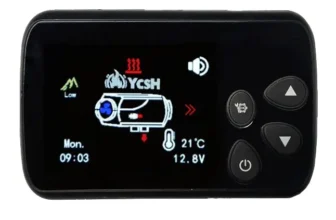
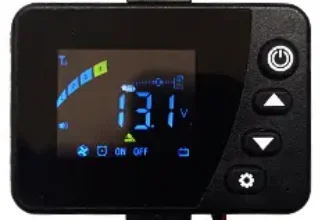


Hello, I have bought a stationary heater that has a ch screen. 17 but it doesn't do the functions you explain ( or I'm not clear) Could you explain to me how to link the remote control??
Hola, I'm sorry, but in that version of the screen I don't know how to link the remote control. The manual they gave me did not explain it. And I don't have the screen to test.
If you enter the group of facebook, maybe someone who has it has discovered how to do it.
Greetings.