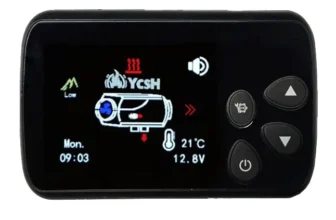
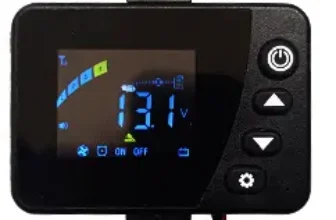
How to turn the heating on or off
To turn on: We leave the power button pressed for 3 seconds. will light up.
to turn it off: We leave pressed 3 seconds and OFF will appear on the display. The process takes a few 10/15 minutes until completely cooled (temperature below 55º).
Temperature regulation
Flecha izquierda para aumentar
Flecha derecha para disminuir
Operating modes
To switch between one mode or another: Press left arrow + power button
By power
If we have not touched the configuration, it can be varied between P1.4 and P5.4 (equivalent to HZ on other screens)
By temperature
It can be varied between 8 degrees and 35.
This screen when having only 3 buttons, the central power button acts as the confirmation button (ok on other screens)
Menu options:
- Hour
- Room temperature
- Combustion chamber temperature
- Voltage
- altitude
- Error code
purged mode
You have to press the power button + right arrow, H OFF appears, With the arrows we change it to ON and it will begin to purge, switches to OFF to stop.
It only works after connecting it to the power, after a certain time, is disabled, so if it doesn't work, unplug it from the power and plug it back in..
How to synchronize the remote control
Press and hold the right arrow for a few seconds until the display shows HFA, then you just have to press ON on the remote control, make sure it has batteries… they don't usually bring it, the stack model is: GP27
Internal configuration
Menu layout: Hour / ignition programmer – off / access to combustion parameters
Press and hold the left arrow button for a few seconds.
– The first digit of the hour will start flashing. Adjust it with the arrows and change the digit with the power button.
– Time programming (1 OFF) If you change it to ON you can enter the start time, he (2 OFF) during shutdown time, it's the same, Switch it to ON to be able to enter the off time.
In both cases, you can select between 99h and 59 minutes. Just set how many hours you want it to turn on or off.. For example, turn on in 1 hour, and turn off in 6 hours…
– Combustion parameters: The password is 1688.
Minimum diesel / maximum diesel / minimum fan rpm / maximum fan rpm / voltage / Sn1 (do not touch) / Pf-6 is the power of the spark plug, it is recommended not to touch it. / OFF this last parameter is to change the password
PF Values (1 = 35W, 2 = 40W, 3 = 45W, 4 = 80W, 5 = 85W, 6 = 90W), the default value is 5.
Set power on / off
- Hold down the left key 2 seconds.
- Set the time and press the center button.
- put the (1 OFF) to ON and press the center button.
- Set how long you want the heating to turn on. Example; 1 time, with this we mean, that within 1 time to turn on the heating.
- Press center button.
- put the (2 OFF) to ON and press the center button.
- Set how long we want the heating to turn off. Example; 3 hours, By this we mean that once the heating starts we want it to turn off at 3 hours.
- Press center button (on/off)
- appear 4 lines to enter the password is NOT entered, and are expected to disappear in a few seconds
Video to see how to configure the screen
The configuration varies depending on the pump version and actual heating power., here do you have more information
Novelty! ch13 screen cover


Hay 2 versions, v1 is the one in the photos, The v2 has the rear tab a little larger to prevent it from falling while moving.
V1: Descargar
V2: Descargar